
Recording vocals at home has never been particularly difficult. Getting those vocals to sound like they belong on a finished record is where things become interesting.
A microphone, an audio interface, and a laptop can get you surprisingly far. Then you listen back and discover that your voice sounds thin, certain words disappear behind the instrumental, and every sharp “S” seems determined to damage your headphones.
Naturally, the music software industry has a solution: spend several hundred dollars on plugins.
I find the obsession with expensive mixing software increasingly ridiculous. There are free plugins capable of handling practically every essential stage of vocal mixing, and some come from developers whose paid products are respected throughout the industry.
You can assemble a complete vocal mixing setup without spending anything on additional plugins. I’ve selected ten that solve specific problems, have genuine free versions, and deserve space in a home studio.
My Recommendation for Beginners: Start With These Three Plugins
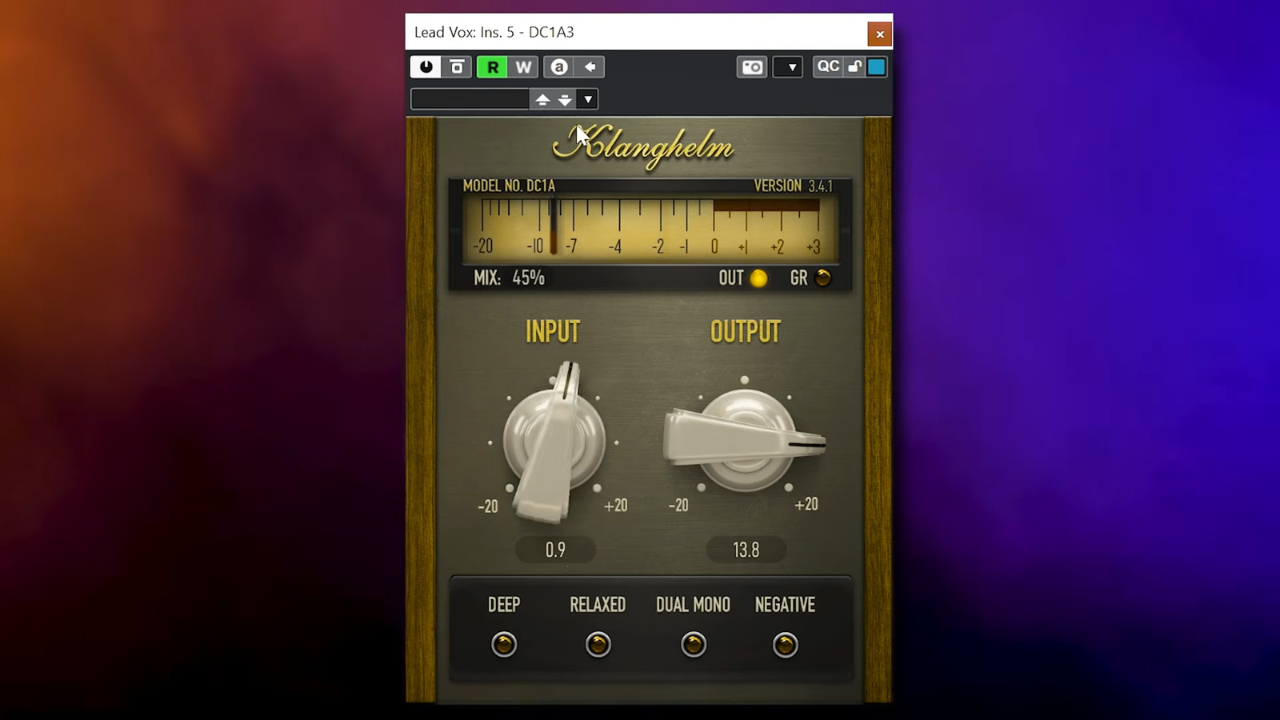
If you’re mixing vocals for the first time, download TDR Nova, Klanghelm DC1A, and TAL-Reverb-4. Start with these three and learn them properly.
They cover three fundamental parts of vocal mixing:
- TDR Nova: Clean up unwanted frequencies and improve vocal clarity.
- Klanghelm DC1A: Control inconsistent volume so the vocal sits more comfortably in the instrumental.
- TAL-Reverb-4: Add a sense of space and help the vocal feel connected to the music.
Start with a dry vocal recording. Use Nova to address obvious tonal problems, apply gentle compression with DC1A, and introduce a small amount of reverb through an effects send. Compare your work against the unprocessed recording frequently.
Once you’re comfortable with that workflow, add T-De-Esser 2 if harsh consonants become a problem. Explore the remaining plugins when you have a specific reason to use them.
My advice is to finish three songs with this basic setup before expanding it. You’ll learn far more from completing actual mixes than collecting another dozen plugins.
1. TDR Nova — Best Free EQ for Vocals
Best for: Removing muddiness, controlling harsh frequencies, and shaping vocal tone.
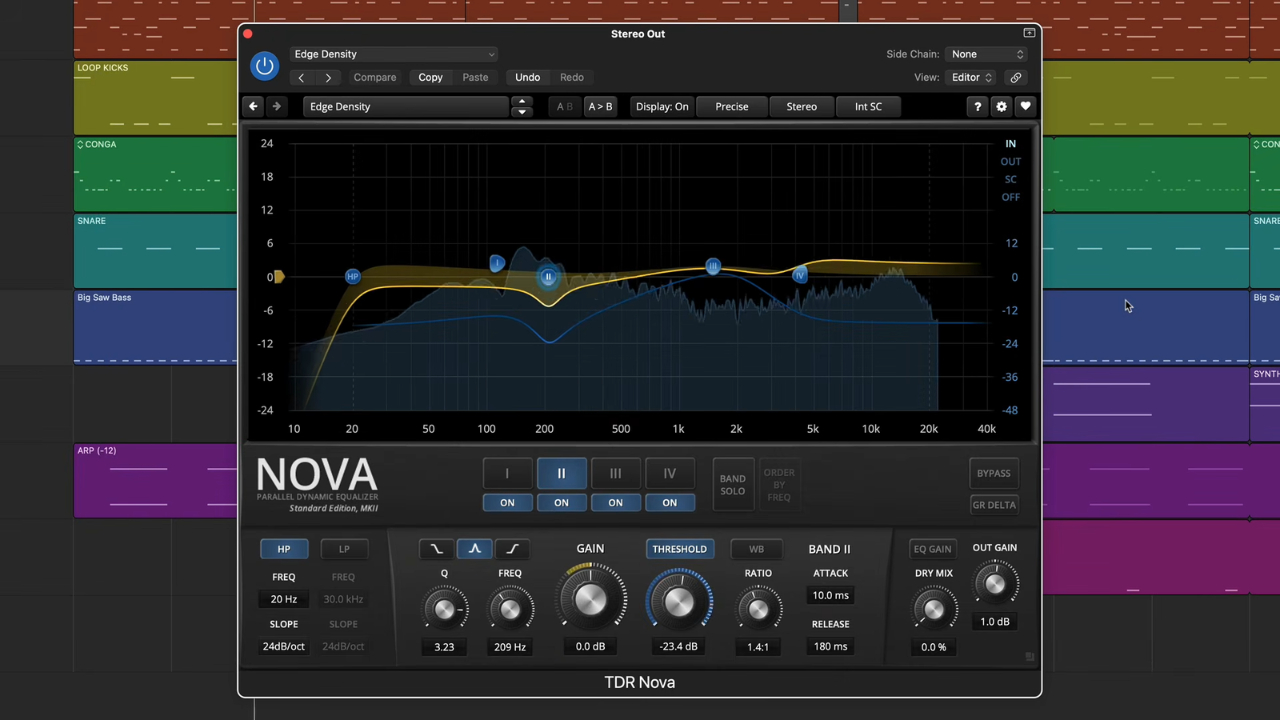
TDR Nova from Tokyo Dawn Records is the first plugin I would recommend downloading.
It’s a dynamic equalizer, meaning it can change how strongly it processes a frequency depending on what’s happening in the recording.
Imagine a singer whose voice becomes harsh whenever they push into louder notes. A conventional EQ cut reduces that frequency throughout the performance. Nova can respond when the harshness becomes prominent.
That’s extremely useful for home recordings, where vocal consistency can be unpredictable.
Start by listening for unnecessary low-frequency rumble, muddy lower mids, and aggressive upper mids. Make small adjustments and compare the result against the original recording.
The free version includes four parametric EQ bands and high- and low-pass filtering.
My verdict: Every home studio needs a dependable EQ. Nova is capable enough to remain useful long after you’ve learned the basics.
2. Klanghelm DC1A — Best Free Vocal Compressor for Beginners
Best for: Evening out vocal volume with minimal adjustment.
A compressor helps control differences between louder and quieter moments. Without compression, a singer might sound perfectly audible during one phrase and practically disappear during the next.
Klanghelm DC1A makes compression wonderfully straightforward.
Its main controls are Input and Output, with additional switches for changing the compressor’s behavior.
Increase the input until the louder passages are being controlled, then adjust the output to match the original volume. Listen carefully to how the quieter phrases sit against the instrumental.
DC1A can deliver gentle leveling or noticeably punchier compression, depending on how you drive it.
I particularly like the design philosophy. Beginners already have enough terminology to learn. A compressor that lets them concentrate on listening is doing something valuable.
Just resist the temptation to compress everything heavily. An overly flattened performance can lose the movement that made it worth recording.
3. Techivation T-De-Esser 2 — Best Free Plugin for Harsh S Sounds
Best for: Reducing distracting sibilance while preserving vocal clarity.
Some microphones make consonants sound brutally sharp, particularly when singers work close to them.
Words containing “S,” “SH,” and “T” can become unpleasant once compression and brighter EQ settings emphasize the upper frequencies.
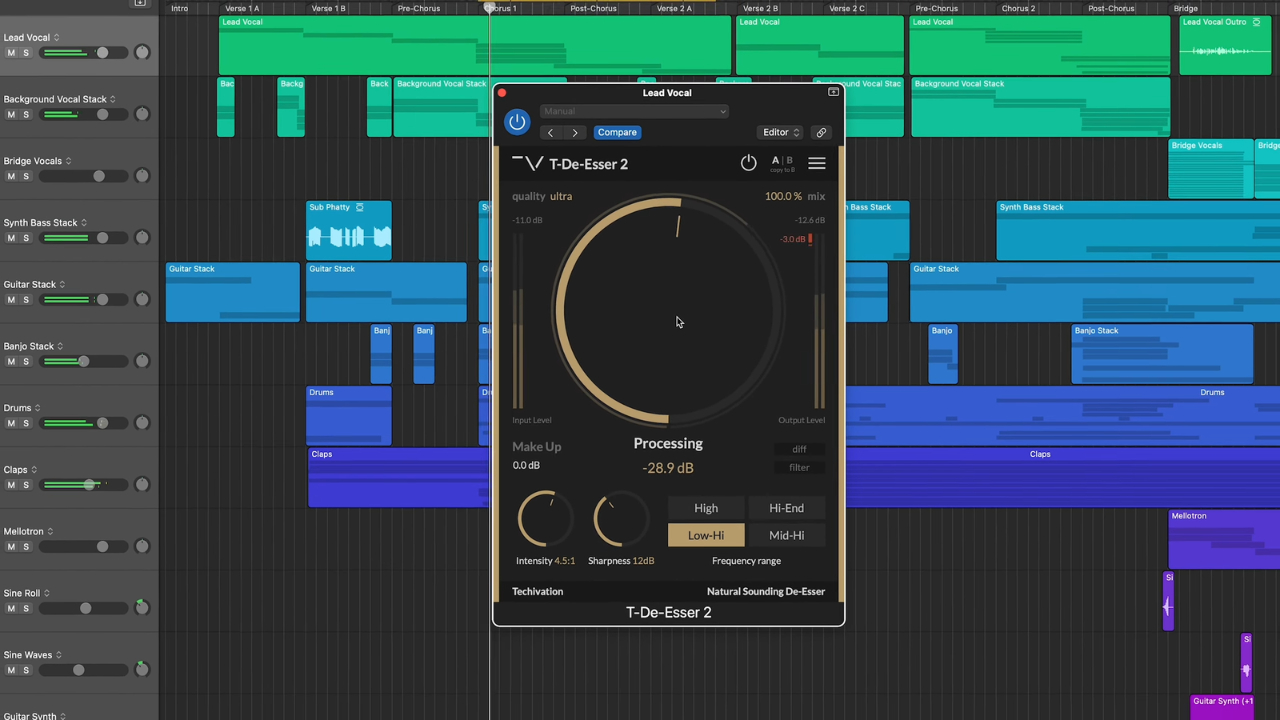
Techivation’s T-De-Esser 2 is designed specifically for controlling that problem.
It offers a relatively approachable interface, frequency-focused processing, and oversampling options. The developer also permits its use in commercial music projects.
Play the harshest section of your recording repeatedly while adjusting the processing. Aim for consonants that remain intelligible and comfortable.
Here’s my rule: if someone suddenly sounds as though they’re singing through a mouthful of cotton, you’ve gone too far.
De-essing is an important finishing adjustment. Heavy processing can become just as distracting as the original sibilance.
4. MeldaProduction MAutoPitch — Best Free Vocal Pitch Correction
View this post on Instagram
Best for: Correcting minor pitch problems and creating obvious tuning effects.
Pitch correction is often discussed as though every vocal needs to be mechanically perfect.
I think that’s a terrible assumption. Small variations in pitch can contribute enormously to a singer’s identity.
Still, there are performances where a few notes need attention.
MAutoPitch from MeldaProduction offers automatic tuning, formant shifting, and stereo expansion. It comes with the company’s free MFreeFXBundle.
Set the correct key and scale, then experiment with the correction speed and amount. Slower, lighter adjustments can help preserve a natural delivery. Faster corrections create a more obvious electronic effect.
Automatic correction has limitations, especially with complicated note transitions and inaccurate musical settings.
The free bundle also reserves certain extras, including advanced preset management and interface customization, for a paid upgrade.
For straightforward home vocal tuning, the essential functionality is already available.
5. Softube Saturation Knob — Best Free Plugin for Adding Vocal Character
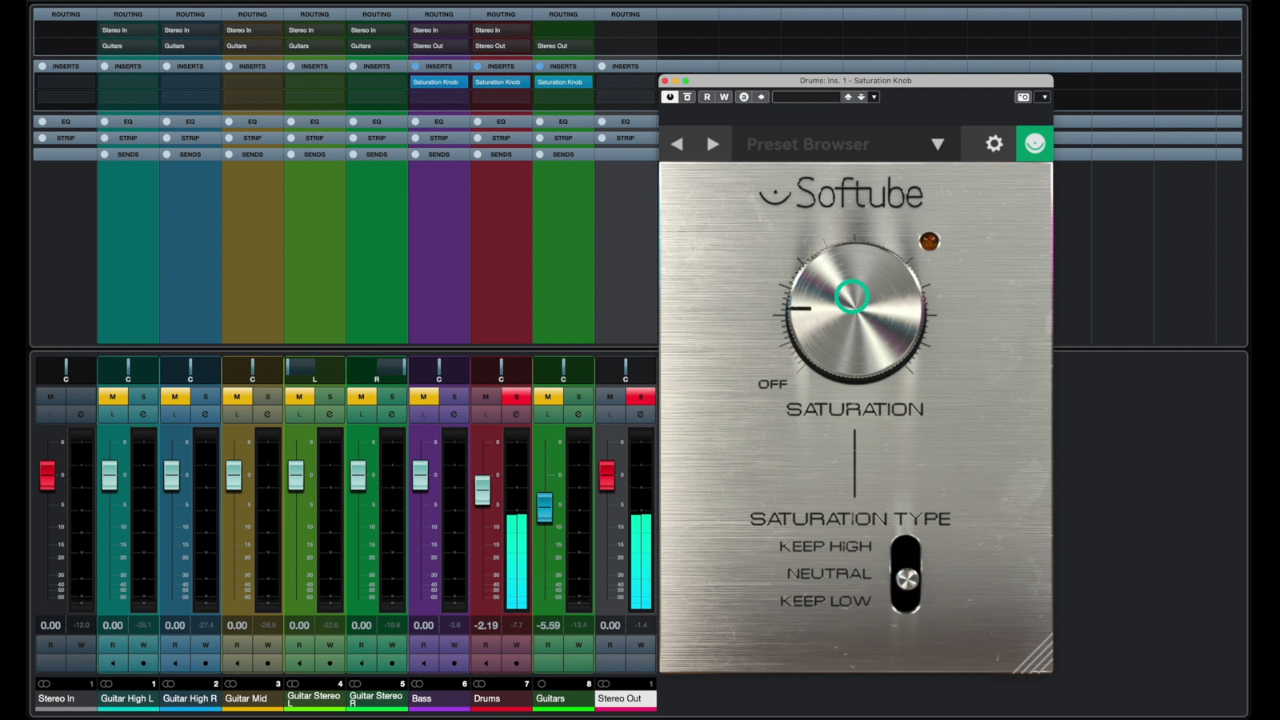
Best for: Introducing harmonic warmth, density, and controlled grit.
A vocal can be technically well-recorded and still feel a little lifeless.
Saturation introduces harmonic distortion that can make a voice sound richer, denser, or more aggressive.
Softube Saturation Knob keeps the process refreshingly simple, with one main knob and three distortion modes: Keep High, Neutral, and Keep Low.
Try a small amount on a thin vocal and compare it at matched loudness. A restrained setting may help the voice feel more present.
You can also push it harder for deliberately rough vocal textures.
My objection is the installation process. Softube requires an account, Softube Central, and an iLok account. That’s considerable administration for a plugin with one main knob.
Fortunately, the software itself is genuinely free.
6. TAL-Reverb-4 — Best Free Reverb for Everyday Vocals
How to set up reverb on your streams – a thread 🧵
Ever joined a karaoke stream and the person sounded like they’re singing in a large hall?
That’s reverb, which you can apply as a filter in OBS to improve your karaoke experience!
Here’s how to make it work 👇
#sipsandtricks https://t.co/v651mFs4v6— Coffee Run ☕🏃 (@itscoffeerun) January 11, 2024
Best for: Adding depth and a vintage plate-reverb character.
Dry vocals can sound uncomfortably exposed, especially when recorded in a small bedroom.
Reverb creates the impression of acoustic space. The challenge is choosing an amount that supports the performance.
TAL-Reverb-4 produces a diffuse, vintage-inspired plate reverb with modulation and useful controls for shaping its sound.
It works particularly well when you want a vocal to feel slightly more spacious without turning the entire recording into an atmospheric experiment.
I recommend putting reverb on a separate effects bus, setting the effect fully wet, and controlling its volume through a send.
That arrangement makes adjustments considerably easier.
A good starting principle is to lower the reverb until individual words remain clearly defined. Let the instrumental determine how much space the vocal can occupy.
7. Valhalla Supermassive — Best Free Reverb for Atmospheric Vocals
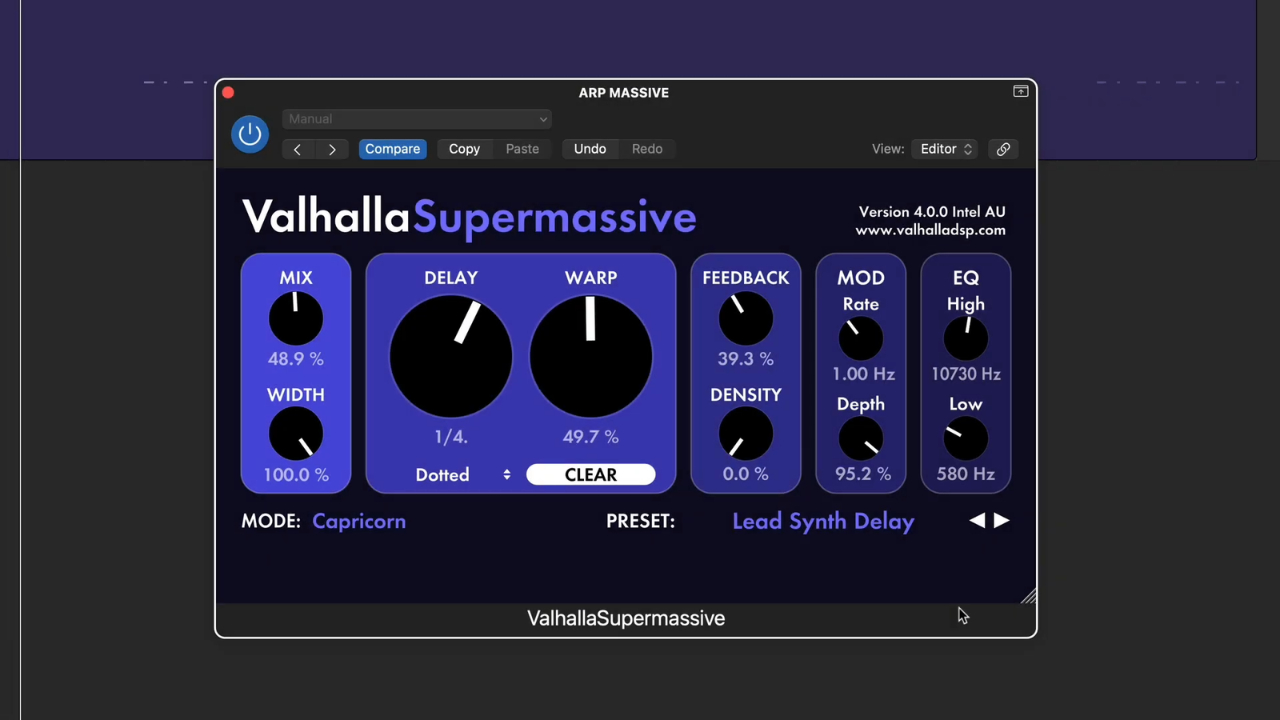
Best for: Huge ambient spaces, dramatic echoes, and experimental vocal effects.
Valhalla Supermassive is one of the most generous free audio plugins available.
It combines reverb and delay processing with multiple algorithms, modulation, filtering, and extensive control over feedback and density.
Its sounds can stretch from relatively restrained ambience to enormous, evolving reverberation tails.
For dreamy indie vocals, cinematic arrangements, and experimental electronic music, that range is fantastic.
There’s also a danger here.
Supermassive makes extravagant effects so easy to create that you can spend twenty minutes admiring the reverb and completely forget the song.
I would reserve the biggest settings for specific phrases, transitions, and background vocals.
Automating a dramatic reverb at the end of a chorus can create a wonderful sense of scale.
Using the same enormous setting across every word usually produces an exhausting mix.
8. Sixth Sample Deelay — Best Free Vocal Delay
Best for: Rhythmic echoes, vocal transitions, and creative movement.
Delay is one of the most useful tools for making vocals feel connected to an instrumental.
Deelay from Sixth Sample offers five delay modes, diffusion, distortion, modulation, and a substantial selection of presets.
You can create conventional rhythmic repetitions, subtle stereo movement, or much stranger effects.
Try a quarter-note or eighth-note delay synchronized to your song’s tempo. Lower the effect volume until the repeats support the vocal without distracting from it.
For a more dramatic result, automate the delay send on the final word of a phrase.
I think delay automation is criminally underused by beginners. It’s an effective way to introduce movement without crowding every second of a performance.
Deelay gives you plenty of creative possibilities, and its core version remains free.
9. iZotope Vocal Doubler — Best Free Plugin for Wider Vocals
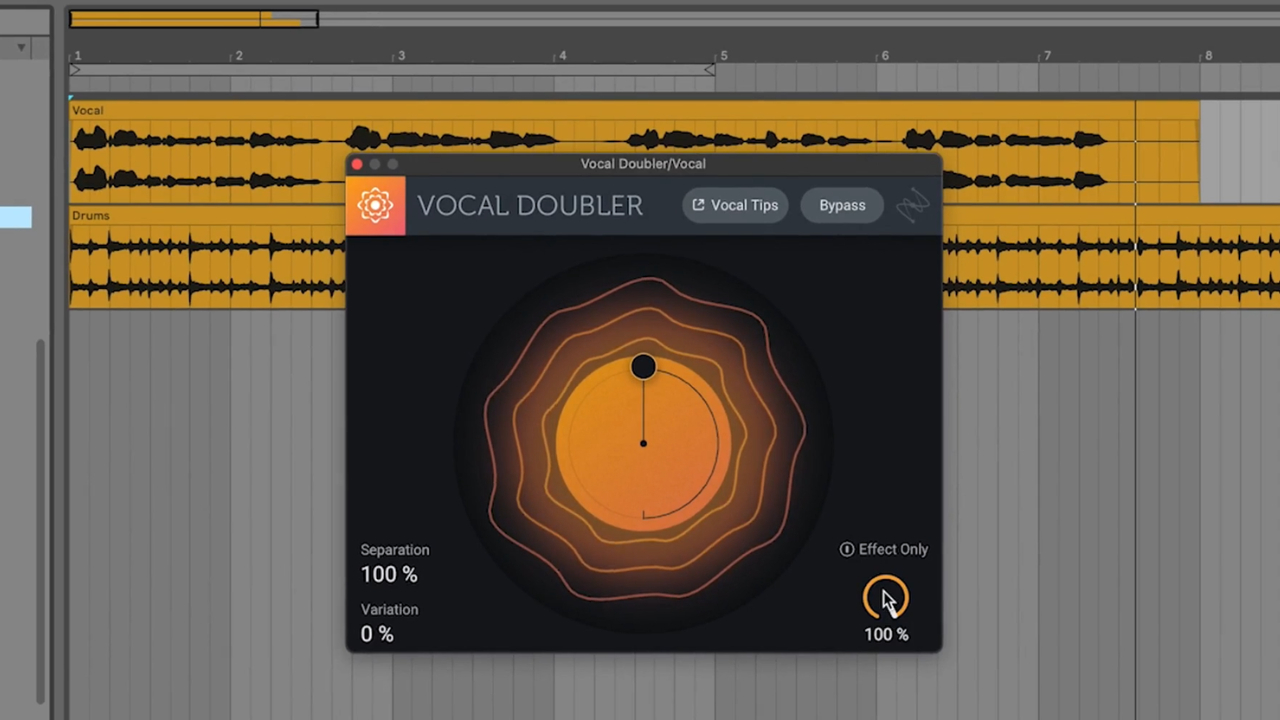
Best for: Adding stereo width and a layered quality to vocal recordings.
Real double tracking involves recording the same performance multiple times. Small differences between takes create width and texture.
iZotope Vocal Doubler simulates aspects of that effect through adjustable separation and variation.
Its interface is exceptionally approachable. You can experiment with the apparent width and timing variation without navigating a complicated control panel.
This is particularly effective for backing vocals, ad-libs, and certain chorus arrangements.
I would be cautious about using aggressive doubling across an entire lead vocal. The central performance needs to remain clear, and exaggerated widening can introduce problems when a mix is played in mono.
A useful test is to switch your monitoring to mono occasionally. Listen for changes in vocal strength and clarity.
Width is impressive when it supports the arrangement. A disappearing lead vocal is a fairly terrible trade.
10. Voxengo SPAN — Best Free Plugin for Analyzing Your Vocal Mix
View this post on Instagram
Best for: Monitoring frequency balance, levels, and potential mixing problems.
Voxengo SPAN deserves a place on this list even though it doesn’t directly change your audio.
It’s a free spectrum analyzer with frequency visualization, level metering, stereo correlation measurements, and loudness-related statistics.
You can use it to investigate excessive low-frequency buildup, monitor peaks, and compare the overall frequency distribution of different recordings.
That information is particularly valuable when you’re mixing with inexpensive headphones or speakers in an untreated room.
However, I strongly dislike the habit of treating spectrum graphs as instructions. Two vocals can produce different frequency distributions and both sound excellent.
Use SPAN to investigate something you’ve heard. Let the meters provide additional information.
Your ears should remain responsible for the final decision.
How to Build a Free Vocal Mixing Chain
With these plugins installed, you have everything needed for a practical vocal processing workflow.
Here’s a starting arrangement:
[su_table responsive=”yes”]
| Stage | Plugin | Purpose |
| 1. Pitch correction | MAutoPitch | Adjust noticeable pitch issues |
| 2. Corrective EQ | TDR Nova | Remove rumble and unwanted resonances |
| 3. Compression | DC1A | Control volume differences |
| 4. De-essing | T-De-Esser 2 | Reduce harsh consonants |
| 5. Saturation | Saturation Knob | Add character where appropriate |
| 6. Spatial effects | TAL-Reverb-4, Supermassive, Deelay | Add space through effects sends |
| 7. Stereo enhancement | Vocal Doubler | Widen selected vocal layers |
| 8. Analysis | SPAN | Check the resulting balance |
[/su_table]
This is a starting point, and the order can change according to the recording. Several stages may be unnecessary for a particular performance.
Before mixing, remove distracting background noise where possible, edit obvious mistakes, and balance the vocal against the instrumental.
Check the result on headphones, ordinary speakers, and a phone. A home mix needs to survive everyday playback conditions, particularly when audio accompanies videos on YouTube’s increasingly important television platform.
And remember that every additional plugin introduces another opportunity to alter the sound.
The Best Free Vocal Plugin Is the One You Actually Understand
There’s a peculiar culture surrounding music production software where owning more plugins has somehow become a substitute for learning to mix.
I think that attitude has wasted an extraordinary amount of money.
The ten plugins here cover practically every essential vocal mixing task, including tone shaping, dynamics, pitch correction, spatial effects, and analysis.
You could spend months learning what TDR Nova and DC1A alone can accomplish.
A good recording still begins with the performance, microphone placement, and environment. Software can improve the recording and help it sit comfortably inside a song.
My advice is to download the tools that address your current problems, learn their controls, and finish some music.
The best vocal mixing setup is the one that helps you complete a convincing recording. Its price tag is a remarkably poor measure of what it can achieve.